Solution
Rombertik is a complex piece of malware with several layers of
obfuscation and anti-analysis functionality that is ultimately designed
to steal user data. Good security practices, such as making sure
anti-virus software is installed and kept up-to-date, not clicking on
attachments from unknown senders, and ensuring robust security policies
are in place for email (such as blocking certain attachment types) can
go a long way when it comes to protecting users.A tool to use for helping others on the PC and/or explaining a PC problem I might have.
Tuesday, June 9, 2015
How to download free
First I want to reemphasize, your safest way to get virus/adware-free software is from a single server. A server is where a complete file is stored (cloud) and can be shared from if you have a link to it.
You hear about getting files free but when you get to the "server" it wants you to pay. How is that free?
Simple, you didn't check the whole page for the free download button.
Free means you have to wait a specific time and usually do a "captiva", which requires you to enter certain letters. If you sign up for a free account on most servers it gives you some advantage.
Downturk is my favorite site and one of my most trusted. He has several other's he suggests and I have used most of them as well. Members only (free) are the only ones that can access links. That said, I will continue with my tutorial.
click on read more to go to the link pages.
select a server to download from (D/L) and it will take you to that server.
Free is always slow speed. Sometimes they surprise you with a fairly rapid D/L. click on the bottom button in the slow column.
It will do a countdown and then give you
a distorted looking captiva. follow the instructions. If you can't make out what it is, you can either get an audio for it or you can ask for a new captiva.
As you can see, it is not picky about caps but if there is a space, put in the space.
I'll take you to another server.
Slightly different set up, click slow download
Don't kow about you, but these old eyes couldn't quite make it all out. Sooo
There, I can make this one out just fine. no holds barred
my D/L button at last. notice the highlighted square? I uncheck these as it is software I don't want. Downloading by my browser works just fine with me.
ALWAYS take precautions and keep your antivirus on. I use AVG Free. As in really free. But pay attention to the download and the install as they offer free trials, for paid software.
Happy downloading.
Saturday, May 23, 2015
Malware Destroys PCs When Detected
Phishing Malware Rombertik Kills Your Hard Drives
InfoSec
researchers at Cisco's TALOS group discovered a strain of malware that
spreads through phishing. Attackers use social engineering tactics to
entice users to download, unzip, and open the attachments that
ultimately result in the user’s compromise. The strain is dubbed
Rombertik, monitors everything that happens inside an infected machine's
browser and exfiltrates it to a server controlled by the attacker,
similar to Dyre.
However, when it detects that it is being analyzed, it takes extreme
evasive action; it wipes the Master Boot Record (MBR) and home
directories, trapping the machine in an infinite boot loop. Here is an
example phishing attack (screenshot courtesy Cisco).
The MBR is the first sector of a computer’s hard drive that the machine reads before loading the operating system. However, deleting or destroying MBR involves re-installing of operating system, which almost always means data is lost. In what is likely a bit of sick humor from the crims, in case it cannot get acccess to the MBR, Rombertik works just like ransomware and starts encypting all files in the user’s home folder (e.g. C:\Documents and Settings\Administrator\).
The malware chooses a random 256-byte encryption key for each file, but none of the keys is saved anywhere, so you end up with what is effectively random, shredded bits instead of your files. After the MBR is overwritten, or the home folder has been encrypted, the computer is restarted. Only files with the extensions .EXE, .DLL, .VXD and .DRV will survive.
After further analysis of the threat, Blue Coat shared in a Thursday blog post that Rombertik was “not standalone malware,” but an additional layer around existing crimeware. Rombertik samples it analyzed, for instance, appeared to be used as an obfuscating wrapper for the DarkComet RAT, a password stealer (potentially Pony Loader) and Andromeda malware.
The upshot: Rombertik begins to behave like a wiper malware sample, trashing the user’s computer if it detects it’s being analyzed. While the Cisco Talos team has observed anti-analysis and anti-debugging techniques in malware samples in the past, Rombertik is unique in that it actively attempts to destroy the computer’s data if it detects certain attributes associated with malware analysis.
What To Do About It:
Ultimately, you need to practice defense-in-depth which protects your entire attack surface, but here are two tips that will mitigate attacks like this with the best bang for your IT security budget:
1) Have multiple layers (and different AV engines) of malware scanning in place; the firewall, your mail server/email gateway, and the desktop. That means a different vendor, using a different AV engine for your firewall, your mail server/email gateway and your endpoint AV.
Then filter out almost all email attachment types except a few essential ones. Check out which AV engines your vendors use, because there is a lot of OEM-ing going on in the AV space, which might result in you using the same engine, but with a different label. Not good.
2) Step your users through effective security awareness training and follow up with regular simulated phishing attacks which will keep them on their toes with security top of mind. Find out how affordable Kevin Mitnick Security Awareness Training is for your own organization. Get a quote now and be pleasantly surprised:
Wednesday, January 28, 2015
Tax-Related Scams
FTC Warns About a Huge Increase in Tax-Related Scams
Identity theft is a serious crime. The phrase likely brings to mind stolen credit cards and fraudulent new accounts being opened. But today, the U.S. Federal Trade Commission kicked off Tax Identity Theft Awareness Week to call attention to a new, insurgent type of scam – one where criminals steal your identity to steal your tax refund.
In the scam, a stranger (or possibly someone you know) starts by stealing your social security number. They then fraudulently file a tax return in your name, requesting a large refund payout from the IRS. The bad guys make off with your hard-earned cash, leaving you to unravel the mess they’ve made of your financial records.
That’s not the only type of IRS-related scam being perpetrated now that we’re entering tax season, either. According to the FTC, there’s been a 24-fold increase in reports of criminals posing as IRS agents to scare victims into sending them cash or a pre-paid debit card number.
“We’ve seen an explosion of complaints about callers who claim to be IRS agents – but are not,” explains Jessica Rich, director of the FTC’s Bureau of Consumer Protection. “IRS employees won’t call out of the blue and threaten to have you arrested or demand specific methods of payment.”
What can you do to prevent these types of tax scams? First of all, keep your social security number protected and note that the IRS will never contact you by email, text or social media message to request personal information. Second, don’t wait until the last minute to file your tax return – thieves won’t be able to steal your tax refund if you’ve already claimed it yourself. Finally, keep a close eye on your mailbox for letters from the IRS during tax season. If someone steals your identity and files a duplicate tax return, the agency will send you a letter to report the problem.
If you do find yourself a victim of tax identity theft, it’s important you contact the IRS right away to report the fraud. The IRS Identity Protection Specialized Unit can be called directly at 1-800-908-4490. You can also file a complaint with the FTC by calling 1-877-FTC-HELP or visiting the agency's website
In the scam, a stranger (or possibly someone you know) starts by stealing your social security number. They then fraudulently file a tax return in your name, requesting a large refund payout from the IRS. The bad guys make off with your hard-earned cash, leaving you to unravel the mess they’ve made of your financial records.
That’s not the only type of IRS-related scam being perpetrated now that we’re entering tax season, either. According to the FTC, there’s been a 24-fold increase in reports of criminals posing as IRS agents to scare victims into sending them cash or a pre-paid debit card number.
“We’ve seen an explosion of complaints about callers who claim to be IRS agents – but are not,” explains Jessica Rich, director of the FTC’s Bureau of Consumer Protection. “IRS employees won’t call out of the blue and threaten to have you arrested or demand specific methods of payment.”
What can you do to prevent these types of tax scams? First of all, keep your social security number protected and note that the IRS will never contact you by email, text or social media message to request personal information. Second, don’t wait until the last minute to file your tax return – thieves won’t be able to steal your tax refund if you’ve already claimed it yourself. Finally, keep a close eye on your mailbox for letters from the IRS during tax season. If someone steals your identity and files a duplicate tax return, the agency will send you a letter to report the problem.
If you do find yourself a victim of tax identity theft, it’s important you contact the IRS right away to report the fraud. The IRS Identity Protection Specialized Unit can be called directly at 1-800-908-4490. You can also file a complaint with the FTC by calling 1-877-FTC-HELP or visiting the agency's website
Sunday, September 28, 2014
'Shellshock Bash' Bug
What is Shellshock (and Bash)?
Shellshock is a security hole located in a component of the Unix operating system called Bash that handles commands. Few computers these days run Unix itself – it’s an antiquated OS conceived many decades ago. But since Unix is the grandfather of the Linux and Mac OS X operating systems, they too contain the Shellshock Bash vulnerability. Nearly half of the webservers currently in operation run Linux, so that’s a very big problem.The vulnerability would let hackers run virtually any command on the machine they want. A person could steal your personal and financial data from one of the many, many website servers that currently run a version of Linux. Or they could connect to your connected home network and turn on your Wi-fi home security camera (again, Linux-based) to spy on you. Or they could take over your MacBook. The possibilities are nearly endless, simply because the Shellshock bug can be exploited in so many ways.
How can you stay safe?
The biggest security implications of Shellshock deal with the webservers that house many of your favorite online sites and accounts. There's little you can do here other than wait for their administrators to patch the bug. The good news is that these holes are being patched quickly. Many already are.Meanwhile, recognize that your home router, connected home devices and possibly your home computer could have the security hole, too. Keep an eye out for emails from your Internet service provider on the topic, in case you need to update the firmware on your router. Use common sense, however – some hackers may use this threat as an excuse to send phishing emails or to try and trick you into downloading malware to your computer.
If you own an Apple computer running OS X, it's vulnerable to the Shellshock Bash bug. (Windows-based PCs should be safe.) Make sure you install security updates to your operating system ASAP once Apple provides them. Of course, this should be standard operating procedure as it’s the first line of defense against compromises, known or otherwise.
Update (9/26): The computer security specialists at TrendMicro have released a set of free tools for those concerned about the Shellshock bug. They will let you know if a website you're visiting is vulnerable to Shellshock Bash. And for more advanced users and server administrators, patching and threat analysis tools are also available. You can access the free protection suite by visiting the TrendMicro website.
More good news: Apple says the "vast majority" of OS X devices should be safe from Shellshock unless you have manually configured advanced UNIX services. If you're not sure what that means, your computer is probably fine. Still, Apple is promising to quickly release a security patch to addresses the issue for all Mac users; everyone should install it when it becomes available.
Sunday, August 24, 2014
Biggest Facebook Mistakes
5 of the Biggest Facebook Mistakes and How to Fix Them
by Natasha Stokes on August 22, 2014
But with regular introductions of privacy-flouting new features and different sets of etiquette for connecting with colleagues, friends, and family, it can be all too easy to make a Facebook misstep that sends the wrong message into the world.
Below are five of the most-common Facebook faux pas – and how to avoid them.
1. Not putting a professional face forward
If you haven't been keeping an eye on your privacy settings, photos and posts intended for friends can end up on your boss's newsfeed. A CareerBuilder study found that nearly 39% of employers use social media to screen job candidates, and a 2012 report from technology research company Gartner predicted that by 2015, 60% of employers will be monitoring employees on social networks.If your boss is your Facebook friend, you can prevent him or her from seeing what you post by going to Settings > Privacy > “Who can see my future posts”, selecting “Custom” from the dropdown menu and add their names. To keep them from seeing posts and photos you're tagged in, go to Settings > Timeline and tagging > “Who can see things on my timeline,” select Custom from the dropdown menu, and add their names.
If your boss or potential employer isn't your Facebook friend, simply go to Settings > Privacy then select “Friends only” as the audience for “Who can see my future posts” and “Limit past posts.” On the same page, you can also edit who can look you up — public, friends of friends, or friends only — and disable Google and other search engines from linking to your Facebook profile.
Finally, you can create a Restricted list — anyone on this list can only see the information and posts you make public. This can be an effective way to avoid looking suspiciously absent from Facebook, without giving up too much information. Head to Settings > Blocking, and edit “Restricted List.”
In all cases, if you and your boss have mutual friends, he or she will still be able to view any posts or photos you may be tagged in with those friends.
2. Oversharing, oversharing, oversharing
We've all done it, but now there’s proof that oversharing is the easiest way to get unfriended on Facebook. A study by Christopher Sibona at the University of Colorado Denver found that the top four reasons people delete friends are because their posts are frequent or trivial posts, polarizing, inappropriate, or too mundane.“Share things that are meaningful, witty, newsy or interesting — and be discriminating in how often you post on Facebook,” recommends Jessica Kleiman, a communications specialist and co-author of the book Be Your Own Best Publicist.
Still, that doesn't mean there isn't an audience for that polemic on national politics (or what you had for breakfast). If there are particular people you think would appreciate more controversial — or more mundane — statuses, you can customize the audience for individual posts. Below the status box, click the tab next to “Post” and select Custom to bring up options for “Who Should See this?.” You can then select a specific audience such as Close Friends, or a custom list (if you made one), say for your sports league. You can also select Custom and manually enter friends that can or can't view the post. You can make this setting your default to avoid future oversharing.
However, Kleiman cautions, “even if you use filters on Facebook to keep your posts only visible by ‘friends,’ one of your 850 closest friends online is probably friends with someone you wouldn't want to see that post.”
3. Allowing Facebook apps to overshare for you
Along with posts about that ham and cheese toastie you were eating, oversharing may take the form of posts by apps you've linked to Facebook.Privacy protection company Secure.me found that 63% of apps request the ability to post on the user's behalf. While giving this permission may allow your info to be shared where it shouldn't, more irking is the fact that, say, Spotify can post what ‘80s pop ballad you're listening to, or Candy Crush Saga can update all your friends on your progress.
You can allow or disallow third-party apps to post to Facebook when signing up, but if you didn't do that, you can edit all permissions from a single page. Select Activity Log from the top right dropdown menu on your profile or news feed, then All Apps (on the left) to view posts made by apps.
To prevent individual apps from posting, hit More (under All Apps), scroll to the offending app, then click the top-right arrow to customize where the app can post to on your behalf — certain friends, all friends, or not at all. You can also tweak the audience for each post by clicking its lock icon. Click the neighboring pen icon to remove the post from your Timeline, mark it as spam, or delete the app from your Facebook profile entirely.
4. Allowing others to post content about you that you don’t like
A Pew Research Center survey found that one of the aspects users most disliked about Facebook was that friends can post personal content, such as photos, about a user without his or her permission.If you've been tagged in an unflattering photo, you can remove the tag by clicking on the photo, hovering over its base, and selecting Options / Remove Tag, so that the picture will not turn up in “Photos of You.” To stop it from appearing on your profile page, you must separately toggle “Allow on timeline” to “Hide from Timeline” in the top-right of the window. However, the photo can still be viewed in other people's news feeds and the poster's albums page, so if you abhor the picture, contact your so-called friend and ask them to take it down.
You can also disable certain — or all — people from posting on your Timeline. Go to Settings > Timeline and Tagging > “Who can add things to my timeline” and select “Only Me.” *(Friends will still be able to view your Timeline.)
To block particular people, head to Settings > Blocking, and add the names to the Restricted list. Then go to Settings > Timeline and Tagging > “Who can add things to my timeline,” and select “Friends.” Friends on the restricted list won't be able to post on your Timeline, or view it unless you have set it to be public.
5. Being resigned to a boring news feed
Does it feel like you're reading more and more posts from friends you don't really care about? You're probably not imagining it. In December, Facebook updated its newsfeed algorithm to push up posts with links and push down memes. Links with more comments were also favored. Stories that show up are also influenced by which friends you interact with the most.Meanwhile, a Stanford University study found that user posts that aren't liked or commented on tend to be viewed by fewer people, so you may find that your college buddy's engagement announcement floats to the top of your feed, while your best friend's gripe about the cost of daycare is nowhere to be seen.
To get around this, head to your feed, click on “News Feed” in the top left, and toggle the option to show Most Recent instead of Top Stories. To ensure particular friends' posts pop up on your feed, add them to your Close Friends list. On your news feed, scroll down the left-hand menu, hover over Friends and click More > Close friends, then add their names in the right-side text bar. Hit Manage List in the top right to select the particular types of updates you get — for example, photos and status updates, but not games or comments.
If someone's status updates are getting on your nerves, but you're not quite ready to unfriend them, you can unsubscribe from their updates entirely by clicking in the top right of the offending status in your news feed, then selecting “Hide All.”
Sunday, July 13, 2014
Help for GoT players
Gardens of Time is my favorite Facebook game.
It's also the most problematic. Here are a few tips that might help you.
Right click on a flashplayer image will give you this menu
Selecting Global settings will give you a detailed menu
this is the one for GoT. you have to allow minimum of 10kb in order to play the game. this is being used like a cookie for your own game, not really an ad.
selecting settings (local) allows you to set the amount. You need to use global settings (shown above) if you have already blocked it, to allow it.
Blocking ads will not affect your game play.
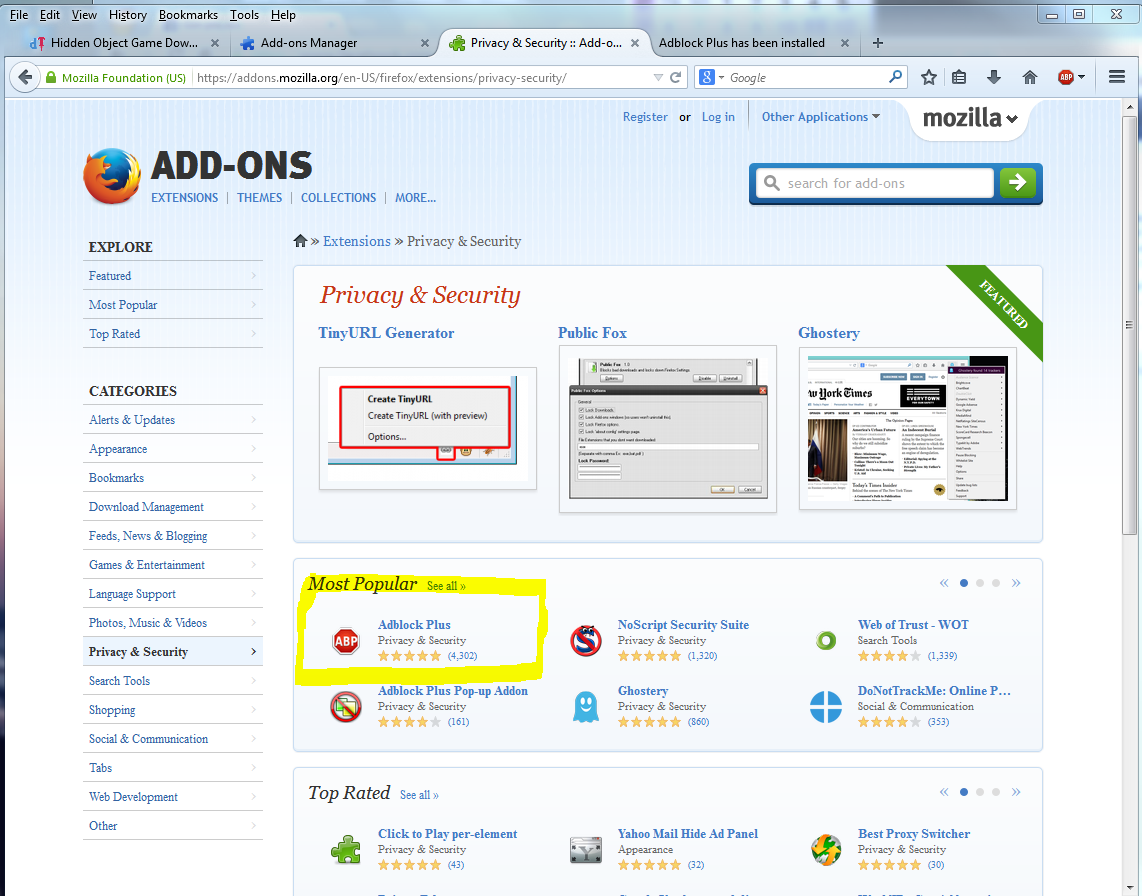
blocking ads will also speed up game play. this is chrome. go to chrome://extensions/
this is the free one. works great.
for Firefox go to add-ons, then get add-ons.
.
Saturday, July 5, 2014
How to Get Great Fireworks Photos with Your Phone
Wish I had read this before last night.
I'm sure it would have worked on my camera as well.

I'm sure it would have worked on my camera as well.
Watching the July 4th fireworks has been a
long-standing family tradition. But, capturing the beautiful aerial
displays can be hard if you stick with the auto settings on your
smartphone. So, try these simple tricks for fireworks photos you'll want
to keep.
1. Use a tripod
When you take picture of fireworks, your
phone's camera needs to hold the shutter open long enough to “see” the
fireworks. The longer the shutter is open, the more susceptible your
photo is to motion blur. So use a tripod to make sure there’s no
movement. Joby's GripTight Gorillapod, which can wrap around trees and
poles or stand up on the ground, is a great option that fits most
smartphones. Price: $29.95 on joby.com or $16.74 on Amazon
2. Use the “landscape” mode
The Camera+ app for iOS lets you set and lock focus manually.
Your phone's camera automatically tries to
find an object on which to focus. And when presented with a black
featureless sky, the camera doesn’t know what to do. By putting your
camera in “landscape” mode, you’ll be presetting the focus to infinity
and narrowing the lens opening, which keeps both near and far objects in
focus.
If your smartphone's camera app doesn't
have landscape mode, you'll want to manually set the focus to infinity.
There's an infinity focus option with Shot Control ($2.99 in Google Play) for Android phones. For iPhones, you can use Camera+ ($1.99 in iTunes) and manually select and set a focal point in the distance.
If you have access to a camera, you'll
want to look for "fireworks" mode. Most point-and-shoot cameras have a
button or dial with “SCN” or “Scene” on it. Otherwise you’ll find it
under the “menu” button. When you put your camera in scene mode, a list
of the available modes will pop up on screen. Select the one that looks
like a spray of fireworks and/or says "fireworks."
3. Turn off the flash
Turning your flash off will let your
phone's camera know that it only has available light to take a picture.
This is important because the camera will then keep the shutter open
long enough to capture the fireworks. The flash button is usually a
separate button on the main camera app screen.
4. Turn down the ISO
High ISO will crank up the sensitivity of
your phone's camera so it can see details in the dark. However, the
fireworks themselves are quite bright. So, to avoid overexposure and
reduce noise, take your camera out of Auto ISO and change the setting to
ISO 100 or even lower. The ISO setting is usually found under the main
menu.
Updated 7/3/2014 with new app information.
Subscribe to:
Posts (Atom)